Building a Self-Hosted RAG Ingestion Pipeline With OXR
A step-by-step build log: self-hosting the OXR document parser with Docker and vLLM and wiring it into a RAG ingestion pipeline, from hardware to chunking to the license check.
 Shipped by Adrian Wei
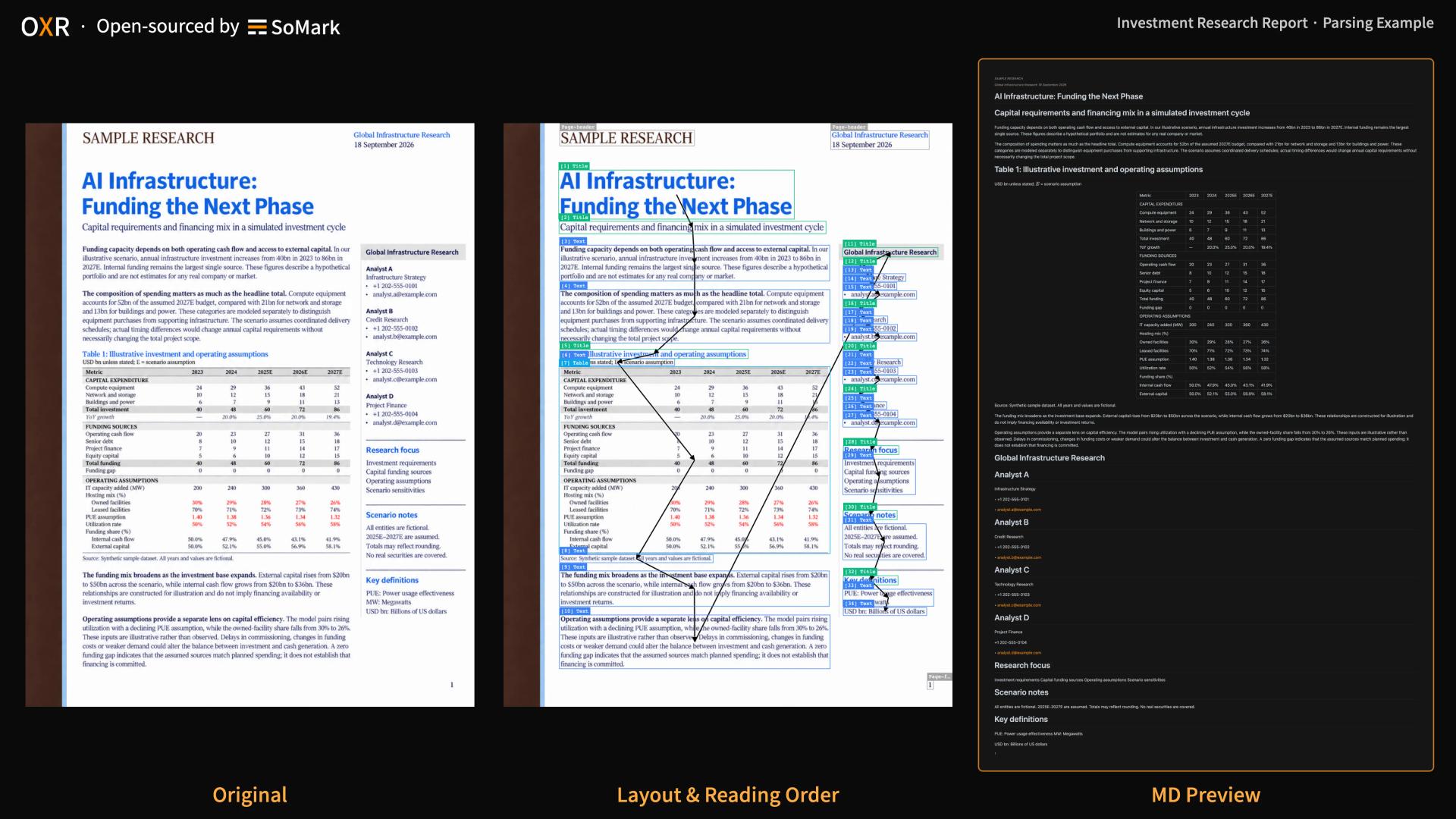
Retrieval-augmented generation projects usually start with the fun parts: picking an embedding model, tuning chunk sizes, writing prompts. Then the first real customer PDF arrives, a two-column research report with a table spanning half a page, and answers start coming back wrong. The cause is almost always upstream, at ingestion, where the PDF became text.
This is a build log for putting a document parser at the front of a RAG pipeline on your own hardware, using OXR, a 1.3-billion-parameter open-weight model SoMarkAI released on October 20, 2026. The commands come from the OXR repository.

An investment research report parsed by OXR: original, layout and reading order, Markdown output. Source: SoMarkAI.
Step 0: Check the output before installing anything
SoMarkAI runs a free API for testing, with no signup and no key. Start there, with the worst PDF you have.
pip install somark
somark --base-url https://free-oxr.somark.ai/api/v1 --api-key dummy \
  parse document.pdf --formats md,json --out ./parsed-output/
The dummy key is a placeholder. You get two outputs: Markdown for reading and quick indexing, and JSON with every element's type and bounding box. The free API queues requests and is meant for evaluation, so use it to decide whether the output is good enough, then move to your own server.
Step 1: Hardware and downloads
The requirements are a Linux machine with an NVIDIA GPU that supports BF16, a driver compatible with CUDA 13.0, and Python 3.12 for downloads. A single GPU with 24 GB of memory handles low-concurrency testing; 48 GB or more is recommended for long documents or more concurrent requests.
git clone https://github.com/SoMarkAI/OXR.git
cd OXR
hf download SoMarkAI/OXR-1.0 --local-dir ./models/OXR-1.0
The weights folder on Hugging Face also contains a lightweight layout analysis model, in layout_analysis/. ModelScope hosts the same files for teams in China.
Step 2: Start the stack with Docker
The system has three services: the OXR model, a layout analysis model, and a document parsing API that coordinates them. The all-in-one Docker image starts all three.
docker build -f docker/Dockerfile.allinone -t oxr-1.0 .
docker run --rm --gpus all --ipc=host \
  -p 127.0.0.1:8000:8000 \
  -v "$PWD/models/OXR-1.0:/models/oxr-model:ro" \
  oxr-1.0
The first start can take a while; the default startup timeout is 900 seconds. When the logs show the services are ready, open http://localhost:8000/demo to upload a file and inspect the original, the Markdown preview, layout boxes and reading order side by side. API documentation is at http://localhost:8000/docs.
If you prefer running from source, the repository documents each service separately. The OXR model runs on vLLM through an out-of-tree plugin shipped with the weights, so the official vLLM image or CLI works without recompiling. The layout service runs on port 8081, the model on 8080, and the parsing API on 8000.
Step 3: Point your ingestion code at it
The local API is compatible with the SoMark API, so switching from the free endpoint is a one-flag change:
somark --base-url http://localhost:8000/v1 --api-key dummy \
  parse document.pdf --formats md,json --out ./parsed-output/
For a pipeline you will usually call HTTP directly:
curl --fail-with-body http://localhost:8000/v1/parse/sync \
  -F 'file=@document.pdf' \
  -F 'api_key=dummy' \
  -F 'output_formats=markdown' \
  -F 'output_formats=json'
The Python and JavaScript SDKs, somark-py and somark-js, work against the same endpoint.
Step 4: Chunk by element, not by token count
This is where a structured parser pays off. The JSON output types every element, and the type tells you how to treat it:
| Element | Output format | Chunking choice |
|---|---|---|
| Table | HTML or Markdown | Keep whole, together with its caption |
| Formula | LaTeX | Index as LaTeX so it stays searchable |
| Code block | Markdown code block | Keep whole; never split mid-block |
| Footnote | Plain text | Attach to the paragraph it annotates |
| Title | Plain text | Use as a section boundary and chunk metadata |
| Header, footer | Plain text | Filtered out by default |
A fixed token window will happily cut a table in half or separate a figure from its caption. Splitting on element boundaries, and starting a new chunk at each title, gives the retriever units that mean something on their own. The bounding boxes let your interface show users exactly where on the page an answer came from, which tends to raise trust in RAG answers more than any prompt change.
OXR recognizes 13 element types in all, including chemical equations in mhchem notation and chemical structures as SMILES, which matters if your corpus includes scientific material.
Step 5: Size the deployment
SoMarkAI's published benchmark gives a planning number. On one NVIDIA RTX PRO 6000 GPU, OXR parsed 100 OmniDocBench pages end to end in 100.972 seconds, about 0.99 pages per second and the fastest of 21 models tested. That is roughly 85,000 pages a day for one GPU running continuously. Your documents will differ from the benchmark set, so time a sample of your own corpus before committing to a schedule.
On accuracy, in SoMarkAI's comparison against published scores, OXR ranks first on olmOCR-Bench (87.84), OmniDocBench (97.18) and DocParsingBench (87.76). The company attributes the results to the architecture, which keeps layout analysis separate and handles recognition and reading order in one pass, and to a recursive self-improvement post-training loop working together. The benchmark document has the full tables.
Step 6: Assess unusual document layouts
If your corpus is dominated by one form type, such as invoices or lab reports, the built-in layout model may draw regions differently than you want. Layout analysis is a separate model and is designed to be replaceable. Its integration interface is not documented, so discuss your document types and requirements with the SoMark team before planning a custom integration.
License check before shipping
OXR’s code and weights are publicly available under Apache 2.0 with additional terms. Review the current LICENSE file for commercial-use thresholds, attribution requirements and scope.
The whole setup, from free-API test to a local stack serving your ingestion jobs, fits in an afternoon. The payoff shows up later, in fewer wrong answers you have to trace back to a mangled PDF.